Published Sept. 25, 2023
Ask most people outside of DevOps what a backup schedule looks like, and they'll picture a checkbox somewhere that says "back up daily." Ask an engineer, and you'll probably get an answer involving cron syntax, a string of asterisks and numbers that looks more like a password than an instruction. That gap between how simple backup scheduling sounds and how technical it actually is under the hood is exactly why so many backup setups end up half-configured, or configured once and never touched again. It's also why backup scheduling, despite being one of the more foundational parts of keeping infrastructure safe, ends up treated as a one-time setup task rather than something that gets revisited as the environment around it changes.
At its core, a backup schedule is just an answer to one question: how often should this server's data be copied somewhere safe? The complexity isn't in the concept, it's in how that schedule gets expressed to the system running it. Most backup tools, and most scheduling systems in general, rely on cron expressions to define timing. A cron expression is a compact string of five fields representing minute, hour, day of month, month, and day of week, and depending on how those fields are filled in, you can express almost any recurring schedule imaginable.
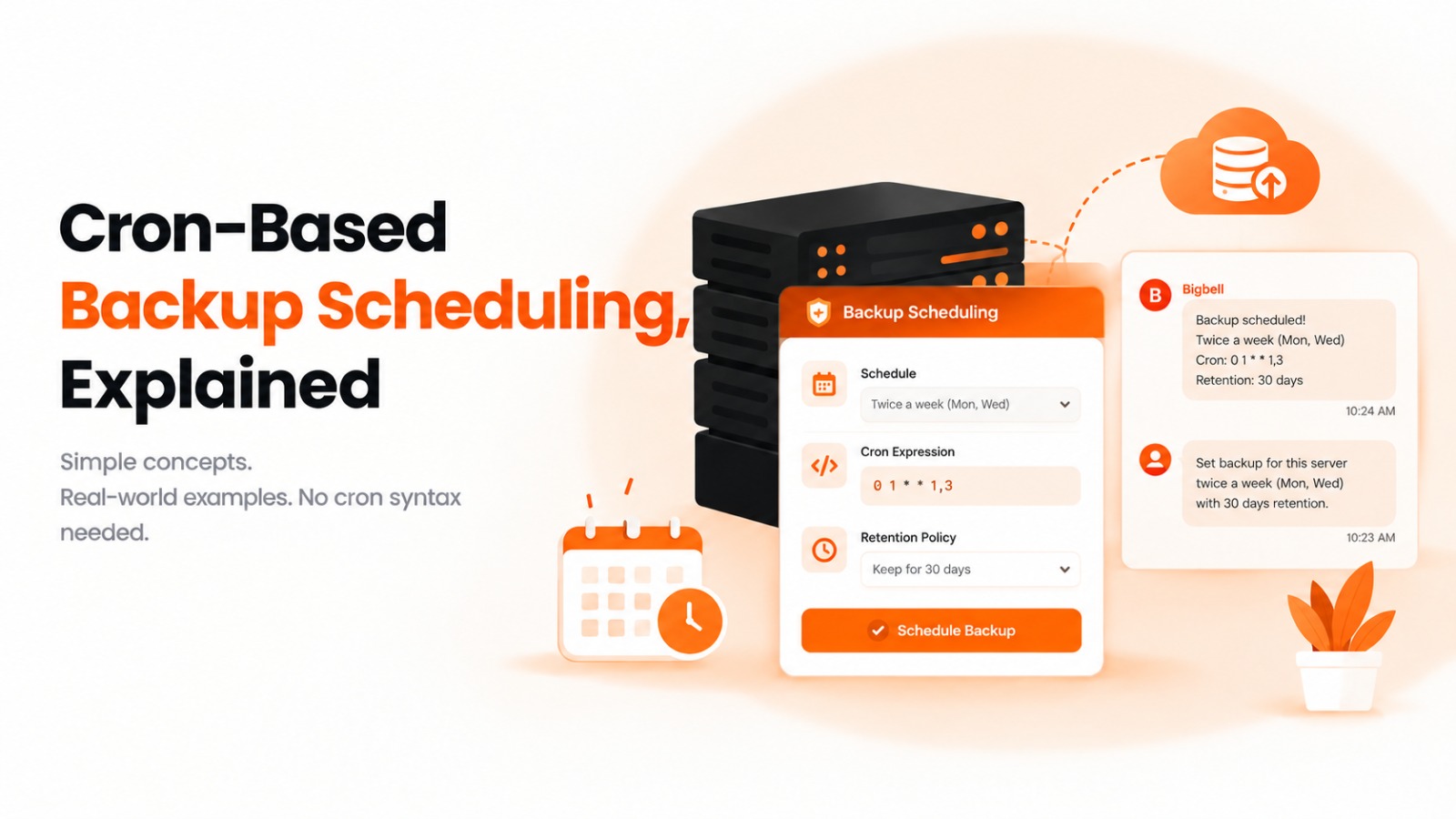
Say you want a server backed up twice a week, Monday and Wednesday. In cron syntax that's expressed as something like "0 1 * * 1,3", where the numbers and the day-of-week field tell the system exactly when to run. It's precise, it's flexible, and once you know how to read it, it's genuinely powerful. But that "once you know how to read it" part is doing a lot of work, because to most people, including plenty of engineers who don't work with cron daily, that string is closer to a puzzle than an instruction.
The misunderstanding usually isn't about whether backups matter, everyone agrees they do. It's about who's actually capable of setting the schedule correctly, and how often that schedule gets revisited once it's in place. Cron syntax is unforgiving. A misplaced field, or confusing the day-of-month field with the day-of-week field, can quietly produce a schedule that runs at the wrong time, or not at all, and the mistake often isn't obvious until someone goes looking for a backup that isn't there.
This creates a strange dynamic on a lot of teams. Setting up backup scheduling correctly becomes something only one or two people really understand, either because they wrote the original cron job or because they're the ones comfortable enough with the syntax to touch it. Everyone else avoids changing it, which means schedules rarely get adjusted even when the underlying need changes, a server that used to need weekly backups now handles more critical data and probably needs backups twice a week, but nobody wants to be the one to edit a cron string they're not fully confident about. That reluctance is understandable. Getting a cron expression subtly wrong doesn't usually throw an error, it just quietly runs on the wrong schedule, or not at all, and the person who made the change may not find out until much later, if ever.
The result of this is backup scheduling that's technically correct on day one and increasingly stale as time goes on. Teams add new servers and either forget to schedule backups for them at all, or copy an old cron expression without checking whether it actually fits the new server's needs. Retention policies, how long backup copies are kept before being cleared out, get set once and rarely revisited, which means storage either fills up with backups nobody needs anymore, or gets cleared too aggressively and a copy that was actually needed is already gone.
None of this happens because teams don't care about backups. It happens because the mechanism for managing backup schedules is technical enough that it discourages routine maintenance, and routine maintenance is exactly what a good backup strategy needs, since server needs change over time even when the backup configuration doesn't.
Bigbell's approach is to keep the power of cron-based scheduling while removing the barrier of having to write or read cron syntax by hand. Instead of editing a config file or a separate scheduling console, you set and adjust backup schedules directly through chat, in plain instructions, and Bigbell translates that into the underlying cron expression for you. Need a server backed up twice a week, Monday and Wednesday? You say so, in chat, and Bigbell handles constructing the actual schedule, something like "0 1 * * 1,3" running behind the scenes, without you needing to know that syntax at all.
This isn't limited to setting a schedule for the first time. Because it runs through chat, adjusting an existing schedule is just as simple as setting a new one, which matters because backup needs do change, a server that starts handling more critical data can move from a weekly schedule to twice a week with a single instruction, instead of someone needing to track down and carefully edit an existing cron job. Retention is part of the same conversation too, so you're not just setting when a backup runs, but how long each copy sticks around before it's cleared, all through the same chat-based flow.
And because Bigbell also identifies when a server's backup isn't actually running, the two pieces work together directly. If a gap gets flagged, you can reschedule the backup right there in the same conversation that surfaced the problem, rather than jumping to a separate tool to fix what was just found. Setting up scheduling, adjusting it as needs change, and responding when something breaks all live in the same place, which is a very different experience from cron files that only a couple of people on the team feel confident touching.
If you haven't already, it's worth reading about how Bigbell detects backup gaps in the first place, since scheduling and detection are two halves of the same problem. You can see the full backup scheduling and management feature set on the Bigbell Backup Management page, and learn more about how conversational, chat-based control works across Bigbell on the ChatOps page.