Published Feb. 25, 2025
Most cloud teams agree that multi factor authentication matters. Fewer can say with confidence that every user actually has it. One engineer set up a personal access years ago, a contractor was added in a hurry, and a service owner never got around to registering a device. The policy says MFA is required, but the real picture is often different.
This guide compares two ways to approach MFA enforcement in the cloud: checking users by hand, and enforcing it through policy. It then gives a checklist. The first sections are general industry practice. The last section covers only what Bigbell provides, and Bigbell does not enforce MFA.
In this approach, MFA is a team rule. An administrator reviews the user list now and then, finds people without MFA, and asks them to register. Reviews may happen quarterly, or when an audit is near.
This works for small teams, needs no changes to how people sign in, and is easy to start today. It also helps people understand why the rule exists, since each reminder is a conversation.
The weakness is that nothing stops a user without MFA from signing in. A new account can sit unprotected for weeks until the next review. Reviews depend on someone remembering, on the list being complete, and on people responding. As the team grows, the gap between the rule and reality widens.
In the second approach, the cloud or identity provider itself requires MFA. Sign in is blocked or restricted until a second factor is registered, and the rule applies to every user in scope automatically. Each major cloud and identity platform has its own way to configure this, such as account level policies that deny actions without MFA, or conditional access rules.
The strength is certainty. A new user cannot bypass the rule, and the requirement does not rely on anyone's memory. Administrators spend time on exceptions instead of chasing individuals.
The costs are planning and care. A strict policy can lock people out if rolled out carelessly, so teams need a recovery path, a rollout order, and a plan for service accounts and automation, which cannot respond to a prompt. Some users, such as those who only use programmatic access, need different handling.
| What matters | Manual checking (Option A) | Policy based enforcement (Option B) |
|---|---|---|
| Reliability | Depends on people | Applies to everyone, every time |
| Speed to start | Immediate; a list and a reminder | Needs planning |
| User disruption | Gentle; nobody is blocked | Needs communication and a safe rollout |
| Evidence | A periodic user list | Settings show intent; a list confirms the result |
| Automation accounts | Not solved | Not solved; needs separate controls |
Choose manual checking only as a starting point, or for a very small team. It is better than nothing, but it should not be the long term plan for production access.
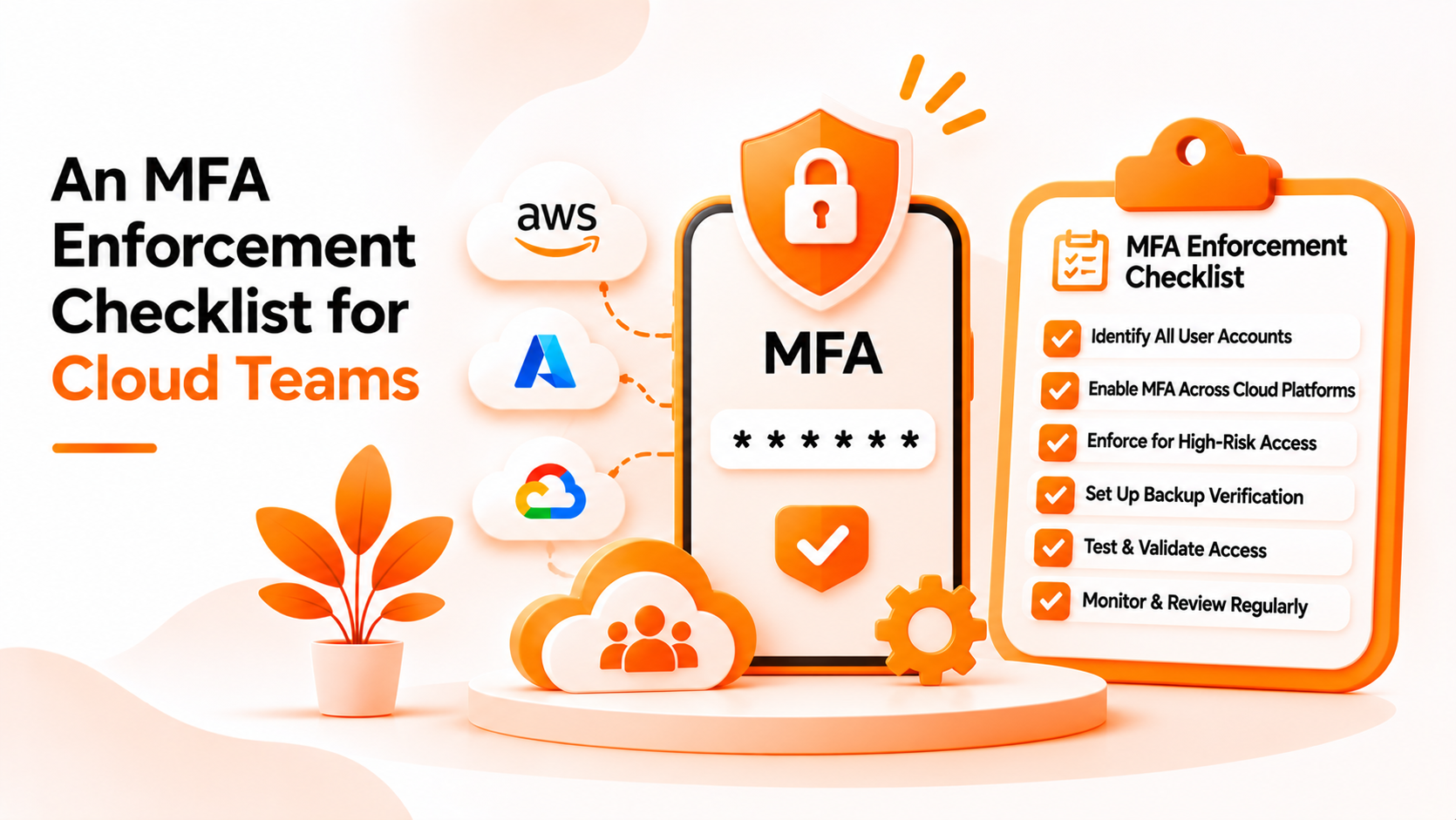
Choose policy based enforcement for any environment with sensitive data or admin access. Here is a practical checklist:
The last step is where manual checking remains useful. Even with enforcement, a recurring review confirms that the policy is working and that no exceptions were forgotten.
Bigbell does not enforce MFA. It cannot require users to register a device, change sign in policies, or lock accounts. What it can do is help with the review step.
The Cloud Security Scanner can check two identity systems today. For AWS, it looks at IAM users and reports which ones do not have MFA enabled, along with whether they have console access. For Microsoft Azure, it looks at Microsoft Entra ID users and reports which ones are not registered for MFA. If some of the affected users have console access, the finding is raised to high severity. The recommendation attached to it is to require MFA for interactive users and remove unnecessary console access, and the affected users are listed by name.
There are important limits. For Google Cloud, Bigbell does not report an MFA finding, because Google Cloud IAM does not expose that information, so the scanner does not guess. Scans are started by a person, so a result reflects the moment it ran. A finding shows registration status, not whether a policy forces sign in with it. Bigbell also does not check service accounts or access keys for MFA, and it does not fix anything for you.
Used well, it gives your team a quick list of who still needs attention, which you then resolve in your cloud or identity provider.
Book a demo to see how the MFA findings look for your accounts.
What is MFA enforcement? Requiring users to prove their identity with a second factor, with the system blocking those who have not set it up.
Is asking people to enable MFA enough? Rarely. Without enforcement, someone can always skip it.
Does Bigbell enforce MFA? No. It reports users who are not registered. Enforcement is configured in your cloud or identity provider.
Which providers does Bigbell check for MFA? AWS IAM users and Microsoft Entra ID users.
Does Bigbell check Google Cloud for MFA? No. It does not report an MFA finding for Google Cloud.
What does Bigbell show about each user? The user's name, and for AWS whether they have console access.
Why does console access raise severity? A user who can sign in interactively without MFA is a higher risk.
Does Bigbell check service accounts? No. The MFA check covers users, not service accounts or access keys.
How often should MFA be reviewed? Regularly, and whenever people join or leave.
What happens if a device is lost? You need a recovery process, so plan it before enforcing MFA.
Should administrators go first? Yes. Their accounts carry the most risk.
Does MFA stop every attack? No. It reduces risk, but other controls such as least privilege still matter.
Do contractors need MFA too? Yes. They often hold broad access and are easy to overlook in reviews.
How do I handle automation that cannot use MFA? Use separate controls such as short lived credentials and narrowly scoped permissions.
What is a phishing resistant method? A sign in method, such as a hardware security key, that cannot be tricked into approving an attacker's request.
Can a rescan confirm my fixes? Yes. After users register, run another scan to see whether they still appear in the findings.
Can I rely on Bigbell alone for MFA compliance? No. It reports registration gaps. Enforcement and evidence come from your identity provider.